
Trust Signals: Introduction

Futurae Trust Signals lets you enrich your authentication and fraud-detection pipelines with device intelligence and behavioral signals. Lightweight SDKs embedded in your mobile app and web pages collect contextual data from user devices; the Signals API then answers discrete risk questions about those devices: are these two devices in the same place?, has this browser been seen before?, is this browser being driven remotely? You can feed the answers into your own risk logic.
Trust Signals is in Early Access. To enable it, contact your assigned Solutions Engineer or support@futurae.com. For what Early Access means for availability and support, see the Product Lifecycle & Platform Support Policy.
How it works
Trust Signals follows a collect-then-query model:
- Collection. Sensor SDKs in your mobile app and web pages collect observations from the user’s device and send them, through your backend, to the Futurae Collection API.
- Retrieval. When your backend needs to evaluate risk, it queries the Futurae Signals API and receives computed, decision-ready results derived from the stored observations.
The two phases are decoupled. A signal can be queried whether or not the SDKs are active at that moment, and the query is invisible to the end user. All computation happens on the Futurae side; the SDKs only collect and forward observations.
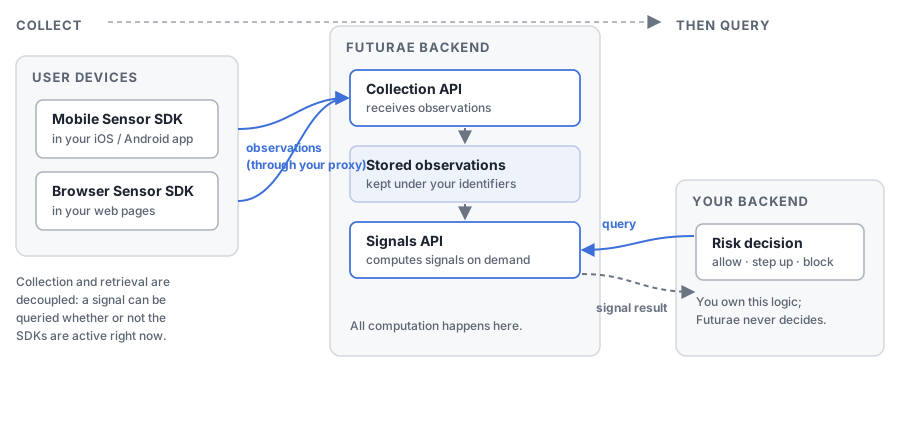
An integration has four parts:
| Component | Runs on | Role |
|---|---|---|
| Mobile Sensor SDK | Your iOS and Android apps | Collects device and network context, on demand or on a schedule: nearby Wi-Fi networks and Bluetooth devices, location, IP address, phone-call state and device metadata. |
| Browser Sensor SDK | Your web pages | Collects the browser fingerprint and behavioral data, such as mouse movement, keyboard dynamics and form focus, while the page is open. |
| Collection proxy | Your backend | Receives observations from the SDKs, attaches the collection token and the user’s identity, and forwards them to the Collection API. |
| Signals API client | Your backend | Queries signals at decision points and applies your own policy. |
The end-to-end flow is:
- Your backend obtains a collection token from the Futurae OAuth2 server and keeps it. The token never reaches the device or the browser.
- The SDKs send observations to your collection proxy, which forwards them to the Collection API.
- At a decision point, such as a login or a payment confirmation, your backend queries the Signals API with a separate signals token.
- The Signals API returns the computed result.
- Your backend applies its decision logic: allow, step up, or block.
The complete list of data each SDK collects is in Data Collection and Privacy.
Available signals
| Signal | What it tells you |
|---|---|
| Latest Proximity | Are the user’s two devices physically co-located? |
| Historical Proximity | Were the user’s two devices ever co-located within a historical time window? |
| New Browser | Is this browser profile new to this user? |
| Geolocation | Where is the device connecting from? |
| Geovelocity | Does the device’s apparent movement speed indicate impossible travel? |
| Active Call | Is the user currently on a phone call? |
| Remote Access Tool | Is the browser being operated via remote desktop control software? |
Each signal is independent: you can query any subset that fits your use case without deploying the others. Which platforms each signal supports is listed in Signal availability.
Where to go next
- Quick Start: a minimal end-to-end integration.
- Core Concepts: the tenant model, the identifiers you choose, and how a query selects observations.
- Authorization and Proxy: credentials, tokens, and the collection proxy your backend runs.
- Mobile Sensor SDK and Browser Sensor SDK: installing and using the SDKs.
- Signals: what each signal means and how to read its result.
- Best Practices: where to integrate, when to collect, naming conventions and a go-live checklist.
- Data Collection and Privacy: what the SDKs collect and how it is protected.
- Limitations and Troubleshooting: current constraints, and how to diagnose a signal that returns no result.
- Trust Signals API Reference: full endpoint, parameter and response reference.