
Trust Signals: Core Concepts

This page defines the concepts the rest of the guide relies on: the tenant, the identifiers you choose, how a query selects observations, and the verification status you attach to them.
Trust Signals separates data at two levels:
- Between tenants. Your observations are separated from every other customer’s by
serviceId, and Futurae enforces that boundary on every request. - Within your tenant. Your own data is organized by identifiers you choose:
accountId,unitIdandinteractionId. They decide what a query can find.
The first is a security boundary. The second is a data-modeling decision, and it is yours to get right.
Tenant isolation
Every customer is a separate tenant, identified by a serviceId that Futurae assigns, such as f47ac10b-58cc-4372-a567-0e02b2c3d479. The Futurae Authorization Server also writes it into every access token, as the signed service_id claim.
Every request to the Collection API and to the Signals API carries serviceId, and it must equal the token’s claim exactly. There is no prefix or partial matching on the tenant boundary:
Token’s service_id claim | Supplied serviceId | Result |
|---|---|---|
f47ac10b-58cc-4372-a567-0e02b2c3d479 | the same UUID | ✅ Accepted |
f47ac10b-58cc-4372-a567-0e02b2c3d479 | any other UUID | ❌ 403: a different tenant |
f47ac10b-58cc-4372-a567-0e02b2c3d479 | (omitted) | ❌ 400: serviceId is always required |
What the model guarantees:
| Guarantee | Mechanism |
|---|---|
| A tenant cannot read another tenant’s observations | serviceId is required on every request and checked against the signed service_id claim. A mismatch is rejected with 403 before anything is read. |
| A tenant cannot widen its own reach | The claim is signed by the Authorization Server, so supplying a different serviceId produces a mismatch rather than broader access. |
accountId is not a tenant boundary. It identifies an end user within your tenant, and it is opaque to Futurae: Futurae has no means of resolving it to a real-world identity. Two tenants can use the same accountId value without collision, because serviceId scopes every observation and every query.
Identifiers
You choose and manage accountId, unitId and interactionId. They appear in observation uploads and in Signals API queries, and together they decide what a signal can see.
| Identifier | Identifies | Set by | Required | Format |
|---|---|---|---|---|
serviceId | Your tenant | Futurae | Always | A UUID |
accountId | One end user | You | Always | Letters, digits and hyphens. Up to 50 characters. |
unitId | The application a Sensor SDK runs in: one mobile app, or one web application | You | On every upload. Optional on queries, except for Remote Access Tool. | Letters, digits and hyphens. Up to 1000 characters. |
interactionId | One interaction within that application: an app installation, or a browser session and page visit | You | On every upload. Optional on queries, except for Remote Access Tool. | Letters, digits and hyphens. Up to 1000 characters. |
A value that breaks these format rules is rejected with 400.
accountId ties a user’s devices together. Observations submitted from a phone and from a browser under the same accountId become comparable, which is what makes cross-device signals such as Latest Proximity possible. Use a value that stays stable for the lifetime of the user’s relationship with you. If you already use Futurae authentication, you can reuse the Futurae user_id.
unitId is static: the same value for every user, every session and every installation of the application. Use a distinct value per application, so that cross-device signals can tell the two sides apart.
interactionId is the per-interaction counterpart to unitId. It changes across installations, sessions and page visits, which lets a query narrow to one interaction instead of everything recorded under a unitId.
How the identifiers nest
One tenant has many users, one user has many applications, and one application has many interactions.
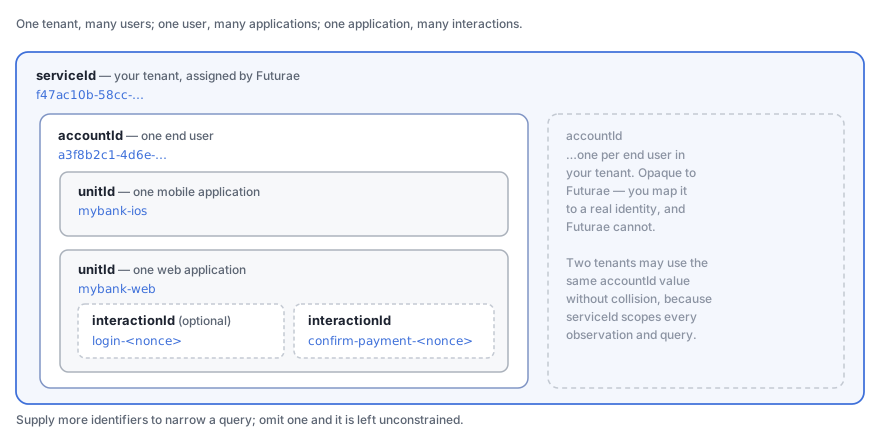
For example, a user opens your banking app on their phone and your web application in a browser. Both SDKs submit observations under the same accountId, the app under the unitId mybank-ios and the browser under mybank-web. At login, your backend asks Latest Proximity whether those two units are in the same place. If the phone is in Zurich and the browser is in São Paulo, you have something to act on. Your backend, not Futurae, decides what to do about it.
How a query is scoped
A Signals API query selects observations by unitId, verificationStatus and interactionId. Each identifier you supply narrows the query, and an identifier you omit is left unconstrained:
| Identifier | How it matches, when supplied |
|---|---|
unitId | Exactly. Only observations stored under this unitId are considered. |
verificationStatus | Exactly. Only observations stored with this label are considered. |
interactionId | As a prefix. The query considers every observation whose interactionId starts with the value you supply. |
The identifiers must be supplied in order: verificationStatus requires unitId, and interactionId requires verificationStatus. A query that breaks this order is rejected with 400.
You narrow a query by supplying more identifiers and broaden it by supplying fewer. For example, a query with only a unitId covers every verification status and every interaction recorded under that application. Omit unitId as well, and the query covers every application of that user. Remote Access Tool is the exception: it evaluates one session, so it requires unitId, verificationStatus and interactionId, and matches interactionId exactly.
Because interactionId matches as a prefix, build it from its most general part to its most specific, so that a shorter value selects a predictable group. An installation identifier followed by a session identifier, for example, lets one query cover every session of an installation, and another query cover one session only.
serviceId is outside this mechanism. It is always required and always compared in full, so broadening a query never takes it outside your tenant.
Paired signals
Latest Proximity, Historical Proximity and New Browser compare two sides. On those signals, every identifier except serviceId comes in two versions: baseline for the reference side and subject for the side evaluated against it, such as baselineUnitId and subjectUnitId. This includes the account ID, so the two sides can belong to different users. The Trust Signals API Reference lists them for each endpoint.
Verification status
verificationStatus records the user’s authentication state when the observations were collected, separately from who the user is. It takes one of three values:
| Value | Use it when |
|---|---|
unverified | The page or app knows who the user claims to be, but they have not authenticated yet: a login page after the username is entered, or a mobile enrollment or account-recovery flow. |
verified | There is a valid, authenticated session: any page after login, or day-to-day use of an enrolled app. |
fraud | A unit or interaction previously labeled verified was later confirmed fraudulent. Relabeling applies from that point forward and leaves other users' history unchanged. |
Tagging observations as they are collected lets a later query ask a narrower question: what did this device look like while the user was authenticated?, rather than what has this device ever looked like?
What Futurae does with it. On submission, Futurae checks only that the value is one of the three allowed values, never whether it is true. On retrieval, the value is a filter over which observations a query considers, exactly like the identifiers above. It does not change how a signal is computed, only which data the computation runs on. On paired signals each side has its own value, baselineVerificationStatus and subjectVerificationStatus, which is how you compare a session against the user’s verified history.
Glossary
| Term | Meaning |
|---|---|
| Observation | One batch of data collected by a Sensor SDK, stored by Futurae under the identifiers it was submitted with. |
| Signal | A computed answer to one risk question, derived from stored observations when your backend queries it. |
| Collection API | The Futurae endpoint that receives observations: POST /api/v1/collections on ts-collection-public.futurae.com. |
| Signals API | The Futurae endpoints your backend queries for signals: GET /api/v1/signals/* on ts-signals-public.futurae.com. |
| Collection proxy | The endpoint on your backend that receives observations from the SDKs and forwards them to the Collection API. See Collection proxy. |
client_id / client_secret | The credentials of the two OAuth2 clients Futurae provisions per integration, one for collection and one for retrieval. Each client_id is a UUID, distinct from your serviceId. |
sdkVersionId | An identifier that Futurae assigns to each SDK version: letters, digits, dots, hyphens and slashes, up to 50 characters. Pass it on a Signals API query to consider only observations from that version. |
| Supporting signal | One of the individual checks that explain a proximity result, such as a shared Wi-Fi network. See Supporting signal types. |